
Poshmark tracking looks simple until your order sits on “Label Created” for two days and you start wondering whether it’s coming at all. Almost every Poshmark parcel moves on one prepaid USPS label, so the status you’re staring at is really a USPS status — and most stuck orders are just a seller who printed the label early. Here’s exactly who carries your package, how to read every scan, and when Poshmark refunds you automatically.
📦 Never refresh My Purchases again
Package Tracker auto-detects the USPS label behind every Poshmark order and pushes an alert at each scan — from “Label Created” to “Delivered” — so you follow all your parcels in one app — free.

Who actually delivers your Poshmark order
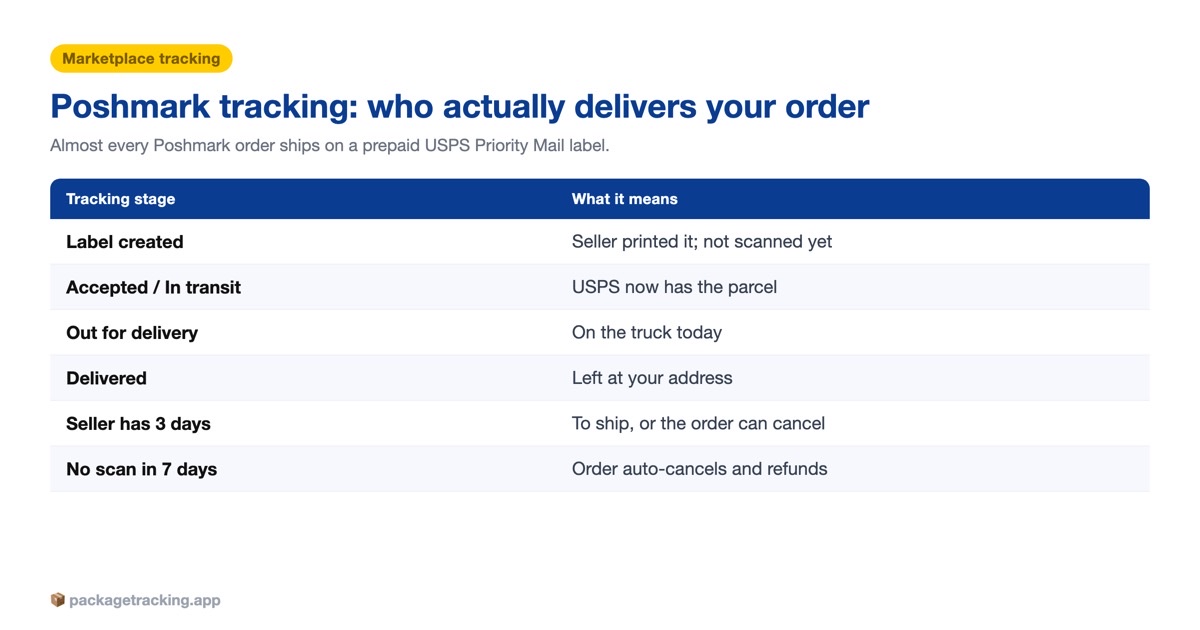
Poshmark isn’t a carrier. It’s a marketplace that hands your parcel to the U.S. Postal Service. The moment you buy, Poshmark generates a prepaid USPS label and emails it to the seller, who prints it, packs your item, and drops it at the post office. Every scan you’ll see in tracking is a USPS scan — the same setup you get over on Vinted and most peer-to-peer resale apps.
One thing changed recently, and it trips people up. On September 12, 2025, Poshmark switched its standard prepaid label from USPS Priority Mail to USPS Ground Advantage — a flat $6.49 for packages up to 5 lb, delivered in roughly 2–5 business days. Older orders, heavier parcels, and some upgraded labels can still ride Priority Mail, so don’t panic if your service line reads differently from a friend’s.
Because the label is always USPS, any tracker recognizes it instantly. You don’t have to tell an app which carrier to use — the number itself is a USPS number, so auto-detection just works. That also means a tracking number that won’t load is almost never a wrong-carrier problem. It’s a timing problem, which the next sections unpack.
Where to find your Poshmark tracking number
Poshmark surfaces the tracking number in three places, and all three show the exact same USPS number:
- Order confirmation email — sent the moment the seller ships; the tracking link points straight to USPS.
- My Purchases in the app — tap the order, then “Track Package” once the seller marks it shipped.
- poshmark.com → My Purchases — the same view on desktop, handy when your phone isn’t nearby.
Track a Poshmark order without the app
You don’t need Poshmark open at all. Copy the number from your email or My Purchases and paste it into USPS.com, or into any tracker that reads USPS. If you lost the email or can’t find the number, you can still track without the tracking number by matching your delivery address and expected date to USPS scan history.
Decode your Poshmark tracking number
Every Poshmark label carries a USPS Intelligent Mail package barcode (IMpb) — a long numeric string with no letters. Here’s how to confirm the number in your hands really is the USPS label, and not something a scammer pasted into a message.
| What you see | What it means | Your move |
|---|---|---|
| 22 digits, no letters (starts 94, 92, 93 or 95) | A domestic USPS label — this is your Poshmark parcel | Track it on USPS.com |
| Begins 9400 1000… | USPS Ground Advantage / First-Class band (today’s default) | Normal — expect 2–5 business days |
| Begins 9205 5000… or 9405 5… | USPS Priority Mail band (older or upgraded orders) | Normal — usually a touch faster |
| Two letters + 9 digits + “US” (e.g. LX123…US) | A USPS international label — rare on Poshmark | Cross-border order; allow extra time |
| Starts with 1Z | A UPS number — Poshmark doesn’t use UPS for standard labels | Be cautious; verify inside the app first |
The takeaway: a genuine Poshmark number is always a plain USPS number pulled from inside the app. If a “seller” DMs you a link or a number that lives outside Poshmark, that’s the classic off-app scam — stop, and keep everything on the platform.
Every Poshmark tracking status, in plain English
USPS statuses read like a foreign language the first time. Here’s what each one actually means for your Poshmark order, top to bottom.
| Tracking status | What’s really happening | What to do |
|---|---|---|
| Label Created / Pre-Shipment / USPS Awaiting Item | USPS printed the label; the seller hasn’t handed the package over yet | Wait 24–48 hours before worrying |
| Shipment Received, Package Acceptance Pending | USPS has the parcel but hasn’t finished the intake scan | Normal — it clears on its own |
| Accepted at USPS Origin Facility / In possession of item | The clock has officially started; your item is moving | Nothing — this is the scan you want |
| Arrived / Departed Regional Facility, In Transit | Hopping between USPS hubs | Normal, even if it goes quiet for a day |
| Out for Delivery | On the truck for today | Be ready; delivery is hours away |
| Delivered | Carrier marked it dropped at your address | Check the spot in the delivery photo, if any |
| Available for Pickup | Held at your local Post Office | Bring ID to collect it |
| Delivery Exception / Return to Sender | Something blocked delivery (bad address, refused, unclaimed) | Message the seller and Poshmark fast |
A few of these deserve their own playbook. If it hangs on Shipment Received, Package Acceptance Pending or won’t move for days, read our guide on a package stuck in transit. When it flips to Out for Delivery but nothing arrives, or it says delivered but you didn’t receive it, those posts walk you through the fix. And a return to sender almost always signals an address problem worth flagging immediately.
“Label Created, Not Yet in System” — the Poshmark stall everyone hits
This is the single most common Poshmark tracking complaint, and it’s rarely a lost package. “Label Created, Not Yet in System” (identical to “Pre-Shipment” and “Shipping Label Created, USPS Awaiting Item”) means USPS generated the barcode but hasn’t physically scanned your parcel yet.
Two things cause it. First, sellers often print the label the second a sale lands to mark the order “shipped,” then drop the box off later that day or the next morning — so the number goes live before the package exists in USPS’s system. Second, USPS sometimes scans a parcel at intake but the data takes hours to appear online. Either way, it typically clears within 24–48 hours once the first real scan posts.
Give it two business days. If it’s still frozen on Label Created after that — especially across a weekend — leave the seller a polite comment on the order asking whether they’ve dropped it off. And remember your safety net: an order that never actually ships is fully protected, which the timeline below spells out.
The Poshmark shipping clock: 3 hours, 7 days, 21 days
Poshmark runs on fixed deadlines, and knowing them turns “is my order coming?” into a simple date check. Sellers are asked to ship promptly — most within a day or two — but your buyer rights key off these hard numbers:
| Time after you buy | What should be happening | What you can do |
|---|---|---|
| First 3 hours | Order confirmed; prepaid USPS label emailed to the seller | Cancel for any reason (if it hasn’t shipped) |
| Day 1–2 | Seller drops off; first “Accepted at USPS” scan appears | Watch for the number to go live |
| Day 2–5 | In transit on USPS Ground Advantage | Normal delivery window — sit tight |
| 7 full days, still not shipped | The order is officially overdue | Cancel on day 8 for a full refund |
| Day 21, still not shipped | Poshmark steps in | Auto-cancel + automatic refund, no action needed |
| Within 3 days of delivery | Payment about to release to the seller | Accept early, or open a case if something’s wrong |
Two lines matter most. If the seller hasn’t shipped after seven full days, you can cancel yourself on day 8 and get every cent back — you don’t have to keep waiting. And if a seller vanishes, Poshmark auto-cancels the unshipped order at 21 days and refunds you automatically. Your money sits in escrow the whole time; the seller isn’t paid until you accept.
After “Delivered”: you have 3 days
Tracking hitting Delivered doesn’t close the loop. Poshmark holds the seller’s payment until you accept the order, and you get 3 days after delivery to inspect the item. Tap Accept if it’s right; open a case if it’s damaged, fake, or not as described. Do nothing and Poshmark auto-accepts on day 3, releasing payment — so don’t sleep on a bad order.
This is where Posh Protect earns its name. Because Poshmark keeps funds in escrow and only pays out after that 3-day window, a package that shows delivered but isn’t in your hands is a reportable problem, not a dead end — open the case before the clock runs out.
Is Poshmark tracking legit?
Yes — the tracking itself is genuine USPS data, and Poshmark is a legitimate marketplace, not a scam site. It listed on the NASDAQ in 2021 and was acquired by Naver for about $1.2 billion in 2023. Every standard order ships on a real, prepaid USPS label with a real barcode, and funds stay in escrow until you confirm delivery.
The risk on Poshmark is never the platform — it’s the occasional bad actor. The golden rule protects your tracking and your refund rights: keep every message, payment, and tracking number inside the app. A number or link sent to you off-platform (by text, email, or social DM) sidesteps Posh Protect entirely. If it didn’t come from My Purchases, don’t trust it.
Frequently asked questions
Buying handmade instead? Etsy order tracking explains why every Etsy order ships on a different carrier.
Open My Purchases in the Poshmark app or on poshmark.com, tap your order, then tap Track Package once the seller marks it shipped. You can also copy the USPS number from your shipping confirmation email and paste it into USPS.com.
Poshmark ships standard orders on a prepaid USPS label. Since September 12, 2025 the default service is USPS Ground Advantage, which replaced Priority Mail. FedEx and UPS are not used for standard Poshmark orders.
It means USPS printed the label but hasn’t scanned the package yet, usually because the seller printed it before dropping it off. It normally updates within 24 to 48 hours. Contact the seller if it hasn’t moved after two business days.
USPS Ground Advantage typically delivers in about 2 to 5 business days once the seller drops the package off. Add the time the seller takes to ship, which is often a day or two.
Yes. Copy the USPS tracking number from your confirmation email or My Purchases and enter it on USPS.com or any USPS-compatible tracker. You do not need the Poshmark app open to see live scans.
If the seller hasn’t shipped after seven full days, you can cancel the order yourself on day 8 for a full refund. If nothing happens, Poshmark automatically cancels and refunds unshipped orders after 21 days.
Poshmark asks sellers to ship promptly, usually within a day or two. Your hard cutoff as a buyer is seven days: if it hasn’t shipped by then, you can cancel on the eighth day.
Check around your door and with neighbors first, then open a case in the Poshmark app within 3 days of the delivery scan. Posh Protect covers items you paid for but never received, as long as everything stayed on the app.
Yes. Buyers can cancel within 3 hours of purchase as long as the seller hasn’t shipped yet. After that you generally have to wait for the 7-day unshipped window unless the seller agrees to cancel.
The tracking is genuine USPS data, so it is as accurate as any USPS scan. Poshmark is a legitimate marketplace owned by Naver, and payments are held in escrow until you accept your order. Keep all communication on the app to stay protected.




1 Comment