
Your InPost parcel is on its way to a locker, but you are not sure when it will be ready to collect. InPost runs the UK's bright yellow 24/7 parcel lockers, and tracking tells you exactly when your collection code is ready. Here is how to track your InPost parcel and follow it in one app.
Buying on Vinted? See our complete Vinted tracking guide — how to track in the app, why tracking sometimes fails, and how to stay covered by Buyer Protection.
📥 Track your InPost parcel
With InPost, Package Tracker follows your parcel to the locker automatically and sends a push notification the moment it is ready — free.


At Package Tracker we follow parcels across 1,700+ couriers, and InPost is growing fast in the UK — especially for Vinted and eBay. The moment to watch for is the ready for collection scan. Here is how.
Track your InPost parcel in one app
Add your InPost tracking number once and follow it alongside Evri, DPD, Royal Mail, Yodel and 1,700+ couriers.
How to track your InPost parcel
- Open the InPost tracking page or the InPost app, or use the link in your retailer's email.
- Enter your tracking number, or paste it once into Package Tracker, which detects the courier automatically.
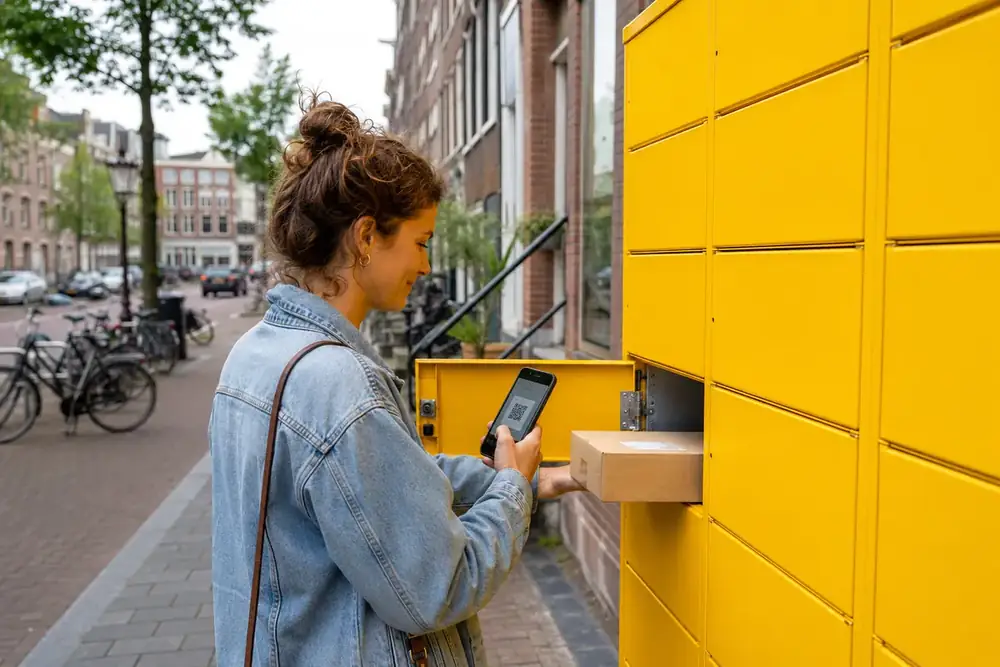
- When it reaches your locker you will get a collection code — bring it, or the app QR code, to open the locker.
For the full method across every courier, see how to track any parcel.
Where to find your InPost tracking number
You will find your tracking number in the retailer's dispatch email, in your InPost or retailer app, or — if you are sending or returning — in the InPost app after you book the parcel.
How InPost lockers work
Collecting from a locker
Once your parcel is ready, InPost sends a collection code. The lockers are open 24/7, and you usually have a set number of days to collect before it is sent back.
Sending and returns
You can also send and return parcels: book in the InPost app, get a code, and drop the parcel at any locker. This is common for Vinted and eBay sellers.
How long does InPost take?
Delivery time depends on the courier the retailer uses to reach the locker. Once your parcel shows ready for collection, you typically have a limited window — often around 48 hours — to pick it up, per InPost.
Never miss an InPost collection
Package Tracker alerts you the moment your parcel is ready for collection, so you do not lose your pickup window.
Why your InPost tracking is not updating
- Awaiting first scan. A new parcel can take a few hours to a day to appear.
- In transit to the locker. Tracking can be quiet while the parcel is on its way to your chosen locker.
- Missed scan. Brief gaps between scans are normal.
If it has not moved in a while, see parcel stuck in transit. If the number will not load, here is the fix: tracking number not working.
What to do if you miss your InPost collection
If your collection window passes, the parcel is usually returned to the retailer. Contact the retailer you ordered from to arrange a refund or a re-send.
Key takeaways
- InPost delivers to bright yellow 24/7 parcel lockers.
- You get a collection code when it is ready; scan the QR to open the locker.
- You usually have about 48 hours to collect before it is returned.
- InPost now owns Yodel, so you can track either in one app.
Frequently asked questions
In France, InPost operates as Mondial Relay. See how it compares with the express alternative in Mondial Relay vs Chronopost.
Enter your tracking number on the InPost site or app, or paste it into Package Tracker. You will get an alert when the parcel is ready for collection at your locker.
When your parcel is ready, you receive a collection code or QR code. The lockers are open 24/7 — scan or enter the code and the locker door opens.
Once it shows ready for collection you usually have a limited window, often around 48 hours, before the parcel is returned to the retailer.
It is sent by InPost when the parcel reaches your locker, and it appears in the InPost app and your notification or email.
Usually because the parcel is awaiting its first scan, still in transit to the locker, or between scans. Short quiet stretches are normal.
Yes. Book in the InPost app, get a code, and drop your parcel at any locker. It is popular for Vinted and eBay returns and sends.
InPost has expanded in the UK and now owns Yodel, so you may see both names. You can track either one in Package Tracker.
Yes. Enter the tracking number on the InPost site or in Package Tracker — no account needed to follow a parcel.
Yes. Add the number to Package Tracker and follow your InPost parcel alongside Evri, DPD and everything else in one app.
Follow your InPost delivery in one app
Save your tracking number, get a ready-for-collection alert, and keep all your orders organised in one iPhone app.
Related tracking guides
- DPD parcel tracking
- Royal Mail tracking
- How to track any parcel
- Evri (Hermes) tracking
- Yodel parcel tracking
- Parcel stuck in transit
- Package Tracker app for iPhone
Mondial Relay runs on the InPost locker network — see how it stacks up against the global courier in Mondial Relay vs DHL.
Mondial Relay runs on the InPost locker network; here is how to read every Mondial Relay tracking status.




6 Comments