
TikTok Shop order tracking should be straightforward, yet the status often barely moves — or shows a courier you have never heard of. That gap between “order placed” and a parcel at your door is where the confusion lives: TikTok hands your package to a rotating cast of couriers, and the app lags behind the carrier. This guide covers it end to end: finding your order, reading your tracking number, who delivers it, delivery times, and fixing stalled tracking.
📦 Follow every TikTok Shop parcel
Drop your number into Package Tracker and it follows your TikTok Shop order across USPS, SpeedX, UniUni, Royal Mail, Evri and every other carrier in one place, then pushes you the moment it moves — free.

How to track your TikTok Shop order
Every TikTok Shop purchase is tracked from inside your order, not from a standalone tracker screen. If you are wondering where can I find my order on TikTok Shop or how do I track an order on Shop, the answer is always the same: open the specific order, then tap its logistics button. TikTok is actively redesigning this area through 2025 and 2026, so the labels differ by app version and country. The path below reaches the same place regardless of what your buttons are called.
Track in the app through Orders
This is the most reliable way to check your order on TikTok Shop. Depending on your app version you may see slightly different wording, so treat the labels as variants.
- Tap your Profile, then open the menu (the hamburger icon in the top corner).
- Choose ‘Your Orders’, ‘Orders’ or ‘TikTok Shop’ — all three open the same order list.
- Alternatively go to Home, tap ‘Shop’, then ‘Orders’; or use Profile menu, then ‘Settings and privacy’, then ‘Orders’. Every route lands on the same list.
- Open the single order you want, then tap the logistics button — labelled ‘Track’, ‘Track Order’ or ‘Logistics Information’ (UK apps may show ‘Track Package’ or ‘Shipping Information’).
- You will see the status timeline: label created, dispatched, in transit, out for delivery, delivered.
Track from the Shop tab
If you prefer to start from the storefront rather than your profile, tap ‘Shop’ from the home screen and open ‘Orders’ there. This is the same order list, so it is a matter of taste which entry point you use. Learning to track your order through Shop this way is handy when you are already browsing and want a quick status check without leaving the tab.
Track by order ID or through the email and SMS link
Your order ID is the number you use to find the purchase and, if needed, to message the seller or TikTok support. You do not type it into a tracking box — in the app you simply open that order and tap Track. Separately, when the seller dispatches, TikTok sends a shipping-confirmation email or SMS that usually contains the carrier’s own tracking number and often a direct link. That link takes you straight to the courier’s status page, which normally shows richer scan detail than the app does.
You are not limited to your phone. You can check the same order status on a computer at tiktok.com by going to ‘Settings and privacy’, then ‘Orders’. And once you have the carrier tracking number, you can follow the parcel on the carrier’s own site or in a single multi-carrier app so you are not re-opening TikTok to check. If the number ever returns nothing, our guide to a tracking number not working walks through the usual causes.

Your TikTok Shop tracking number vs order ID
This is the single biggest source of confusion, and most competitor guides never explain it. Your TikTok Shop order ID and your tracking number are two different things that do two different jobs.
- The order ID (order number) only identifies your purchase inside TikTok Shop. Use it to locate the order and to contact the seller or support. It is not a courier reference.
- The carrier tracking number is what the delivery company assigns. Only this number works on the carrier’s site or in a multi-carrier tracker. Pasting your order ID into a carrier tracker returns nothing.
So if you searched for ‘TikTok Shop order ID tracking’ hoping to drop the order number into a courier lookup, that is why it failed. The order ID identifies the purchase for support; the TikTok Shop order tracking number is the one that feeds external trackers. In the app you never type either — you open the order and tap Track, and TikTok links the two behind the scenes.
The tracking number also tends to appear late, and that is normal. TikTok’s US fulfilment rules give the seller a short handling window (set to one or two business days at shop level) before the carrier must scan the parcel moving. Until that first physical scan happens, you may see a number that exists but shows no events yet — the status sits on shipping label created or ‘pre-shipment’. The seller has printed the label (which generated the number), but the courier has not accepted the parcel. Sellers often batch-print labels to mark orders shipped, then drop them off later that day or the next.
Who actually delivers your TikTok Shop order
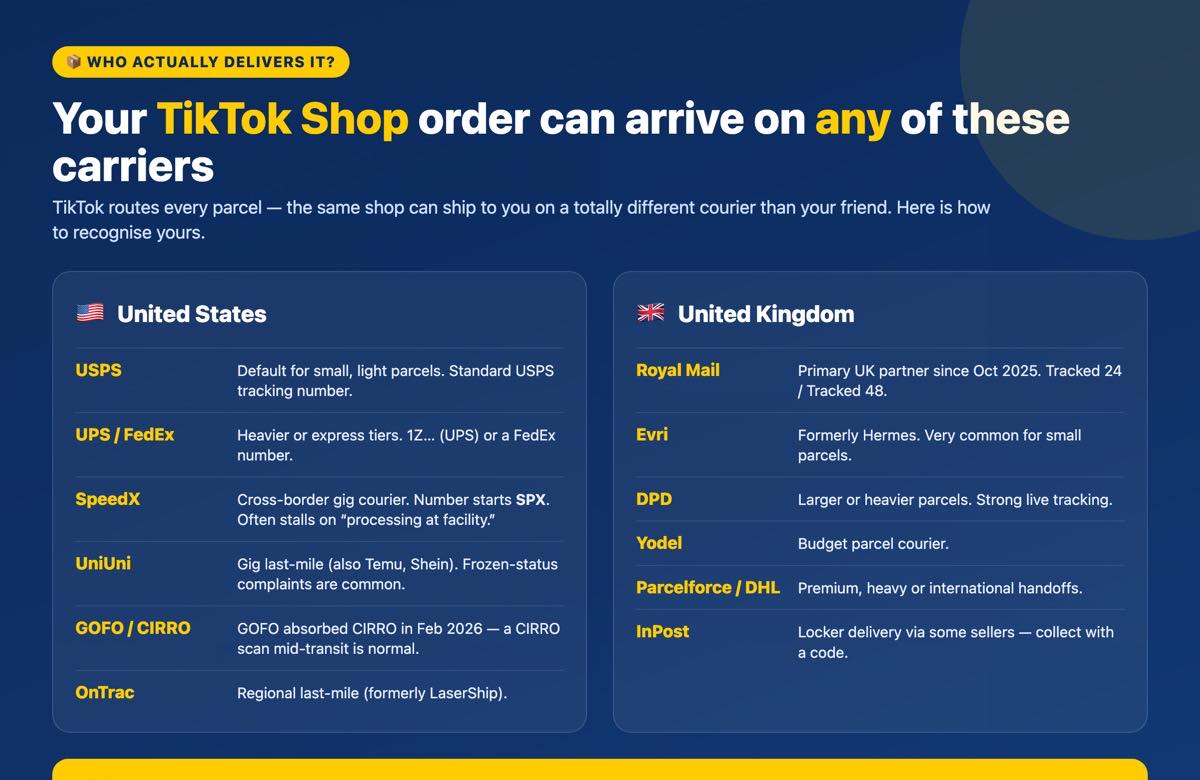
Here is the part almost no guide tells you plainly: you do not choose your carrier, and neither really does the shop. TikTok’s routing picks it, so the same seller can ship via USPS to one ZIP code and a gig courier like SpeedX to another. That is why your tracking looks different from order to order, and why a friend’s parcel from the same store arrives on a totally different network. Knowing how to recognise your carrier is the fastest way to find the right status page.
United States carriers
| Carrier | What to expect | How to recognise it |
|---|---|---|
| USPS | Default for small, light seller-shipped parcels. From January 2026 the label must be bought through TikTok Shipping (a TikTok policy change, not a USPS one). | Standard USPS tracking; may sit frozen in-app if the label source is non-compliant. |
| UPS | Express and heavier tiers; can still be used with the seller’s own labels. | 1Z-style UPS tracking numbers. |
| FedEx | Express and ground tiers; also usable with the seller’s own labels. | Standard FedEx tracking. |
| Fulfilled by TikTok (FBT) | TikTok’s own warehouse program that picks, packs and ships, then hands to a last-mile courier below. | Often shows a ‘Free 3-Day Delivery’ badge on the listing. |
| SpeedX | Cross-border gig last-mile (also Shein, Temu, Amazon). Notorious for stalled ‘processing at facility’ status and thin support. | Tracking numbers start ‘SPX’ — the one reliably confirmed prefix. |
| UniUni | Gig last-mile (Temu, Shein, eBay). Frequent frozen-tracking complaints; support routes best through the seller. | No fully public prefix spec — confirm on the order page. |
| GOFO / CIRRO | GOFO completed its acquisition of CIRRO on 9 Feb 2026 and is absorbing it. A CIRRO- or GOFO-branded scan is not a red flag. | Reaches most of the US; expanding ZIP coverage through 2026. |
| OnTrac (formerly LaserShip) | Regional last-mile, coast to coast. The two merged and rebranded to ‘OnTrac’ in March 2023. | A ‘LaserShip’ reference now means the OnTrac network. |
| Amazon Logistics | On TikTok’s approved US self-ship carrier list. | Amazon-style TBA tracking numbers. |
| Other approved | DHL eCommerce, GLS US, AxleHire, Better Trucks, Lone Star Overnight, Spee-Dee, Wizmo, TForce. The roster rotates. | Varies by carrier. |
If you land one of the gig couriers, our dedicated pages help you read a stalled status: SpeedX tracking, UniUni tracking, GOFO tracking, OnTrac tracking and the legacy LaserShip tracking. If TikTok’s FBT program routes through the mail giant instead, Amazon Logistics tracking covers those TBA numbers.
United Kingdom carriers
| Carrier | What to expect | Best for |
|---|---|---|
| Royal Mail | Primary TikTok Shop UK partner since 9 October 2025. Tracked 24 / Tracked 48, with drop-off, lockers, Post Office and compensation cover. | Most small self-ship parcels. |
| Evri (formerly Hermes) | High-volume small-parcel courier. | Small, light items. |
| DPD UK | Strong tracking, reliable slots. | Larger or heavier parcels. |
| Yodel | Budget parcel network. | Lower-cost small parcels. |
| Amazon Logistics / Parcelforce / UK Mail / DHL UK | Approved integrated UK carriers. DHL is common for premium and international. | Varied; DHL for premium/cross-border. |
| Panther UK / DX | Approved integrated carriers. | Two-person, large or heavy items. |
| InPost | Locker delivery via third-party integration; not on TikTok’s formal integrated list. | Available but secondary to the names above. |
For UK parcels, jump straight to Royal Mail tracking, Evri (Hermes) tracking, DPD tracking, Yodel tracking or InPost tracking. Not sure which of the top two you got? Our Evri vs Royal Mail comparison helps you tell them apart. Some UK orders also arrive through a consolidated international handoff before a UK courier does the last mile, which is why the carrier can appear to change partway through.
How long does a TikTok Shop order take to arrive?
The honest answer to ‘how long does it take to order off TikTok Shop’ is: it depends on where the item ships from and which tier you paid for. The firm numbers are TikTok’s seller-side deadlines, not delivery guarantees to you. Everything else is a realistic range.
In the US, the seller must have the carrier scan the parcel moving within about two business days of ‘Awaiting Shipment’, and the order auto-cancels if no tracking is added within five business days. On the delivery side, TikTok holds sellers to a 95% on-time rate: Standard and Free Economy orders should see a first delivery attempt within six business days, while Express (from 14 March 2025) targets delivery within three business days. In practice, US domestic parcels land in roughly three to seven business days door to door, and you should lean toward that six-business-day Standard cap rather than the optimistic end.
A US parcel is formally treated as lost after no carrier scan for 10 calendar days or 7 business days, which is a useful marker for when to escalate. Business days exclude weekends and US federal holidays, so a long weekend stretches every window.
TikTok Shop to Europe and international orders
TikTok Shop in Europe runs as separate per-country marketplaces — France, Germany, Ireland, Italy, Spain and the UK, with Austria, Belgium, the Netherlands and Poland added in mid-2026 — not one global store. A US storefront does not sell to EU shoppers, so you should buy on your own country’s TikTok Shop. Since 25 August 2025, all UK and EU orders must be delivered within five business days of order creation, enforced through the seller’s On-Time Delivery Rate. That is a single combined handling-plus-transit window, unlike the US per-tier split. UK domestic delivery typically runs two to five working days; items fulfilled from overseas or China warehouses take markedly longer, often seven to fourteen or more working days.
The tax question shoppers really want answered is whether the parcel gets a surprise charge at the door. In the UK, for consignments valued £135 or under sold through the marketplace, VAT is charged at checkout and there is no separate import VAT or duty at the border. Above £135, normal import VAT and customs duty apply on import, and the courier may bill you before delivery plus a handling fee. In the EU, if the seller is IOSS-registered, VAT on goods up to €150 is collected at checkout and the parcel clears cleanly; if they are not, you can be billed import VAT plus a courier handling fee on delivery. Note one change ahead: from 1 July 2026 the EU removes the €150 duty-free threshold and applies a transitional flat customs duty (around €3 per declaration line) on low-value parcels, separate from VAT, with member-state handling likely to vary at first. If a cross-border parcel goes quiet at the border, our package stuck in customs guide explains what is usually happening.
TikTok Shop tracking not updating or stuck? Here’s why
A TikTok Shop order tracker going quiet is common, and most of the time it is a normal part of how these networks move parcels — not a lost package. There are three specific reasons your status stalls, and each has a different fix.
First, the frozen label. For the first 24 to 48 hours (sometimes one to three days), a ‘label created’ or ‘pre-shipment’ status just means the seller printed the label but the courier has not done its first acceptance scan yet. Second, gig and last-mile carriers like SpeedX, UniUni and GOFO route parcels through consolidation hubs, so tracking legitimately goes silent for days then posts several scans at once. Third — and this is the one that fools people — a valid-looking USPS number may never update in the app right now because of TikTok’s 2026 label-source enforcement: TikTok rejects USPS labels and tracking that were not bought through TikTok Shipping (rolling out through Q1 2026). USPS still works; the app just will not reflect a non-compliant label. That is a policy quirk, not a broken parcel.
Use this calibrated ladder to judge when to actually worry:
- 24-48 hours with no movement: routine, especially right after the label is created.
- 24-72 hour gaps between scans: normal for gig carriers moving between sorting hubs.
- 5-7 days silent: concerning but still possible during vendor-to-carrier handoffs or peak periods.
- US ‘lost’ marker: no carrier scan for 10 calendar days or 7 business days.
- Around 10+ days with no movement: escalate to the seller first (they hold the shipping contract), then TikTok Shop support.
There is also a sync-lag pattern worth knowing. Your original international tracking number can freeze while a brand-new local last-mile number quietly carries the live events — the handoff created a second number the app has not surfaced. And the carrier can scan or even deliver a parcel while TikTok still shows ‘in transit’ because the carrier-to-TikTok integration has not caught up. The fix is simple: re-check the number on the carrier’s own site, or use one multi-carrier app that follows the handoff for you. If the events truly are not moving, our guides to a package stuck in transit, a status that keeps moving through the network, and what out for delivery really means will tell you where in the chain your parcel sits. This same freeze-and-handoff behaviour shows up on sibling marketplaces too, which is why Temu tracking, Shein tracking and Vinted tracking feel so familiar.
Is TikTok Shop legit? Refunds and Buyer Protection if your order never arrives
Yes — TikTok Shop is a legitimate, official feature of TikTok. It is also a third-party marketplace, which means scam or counterfeit sellers do appear (the Better Business Bureau has an active alert). The single most important rule protects you from nearly all of it: Buyer Protection applies only to purchases made through the official in-app TikTok checkout. Paying a seller directly, through a messaging app, or on an external linked website voids all protection. Never transact off-platform, no matter how the seller frames it.
US refunds and Buyer Protection
In the US you have 30 calendar days from the ‘Delivered’ date to return most items for any reason. A separate Money-Back Guarantee covers items that arrive damaged or defective for up to 90 calendar days from delivery — that longer window is specifically for damaged or defective goods, not an open-ended 90-day return for any issue. Returnable items priced $10 or under are typically refunded without needing a return, and refunds cover price, shipping and tax. Sellers have two business days to answer a refund-only request up to $100 (four business days over $100) before TikTok may auto-approve. If a seller rejects your return, you can escalate to a formal dispute within 10 calendar days; the seller then has 48 hours to submit evidence or it auto-refunds at their expense.
UK refunds and Buyer Protection
In the UK you have 30 calendar days from receipt to start a change-of-mind return. Sellers respond within two working days, and if they fail to act within two calendar days of receiving the return, TikTok auto-refunds within 14 days. Item-not-received, lost or damaged claims are refunded once the carrier confirms loss or damage, and orders delayed 96 or more hours past estimated delivery may be auto-approved for a refund. UK and EU statutory consumer rights are separate from and can go beyond TikTok’s own policy, so do not assume the US rules apply to you.
A quick fake-tracking check protects you when a parcel never comes: if the tracking number shows a delivery to a different city, or was scanned ‘delivered’ but nothing arrived, keep your evidence and open a claim rather than assuming it is lost — our guide to a package delivered but not received covers exactly this. Watch for the classic scam signs too: cloned stores, fake or recycled tracking numbers, and empty or wrong-item parcels. If you receive a package you never ordered (a ‘brushing’ scam), the FTC says you do not have to pay for or return unordered merchandise, and you should not scan any QR code included with it — treat it as a sign your data may be exposed. Buy from verified sellers, read photo and video reviews, pay by credit card for chargeback rights, and film your unboxing so a claim is easy to prove.
Frequently asked questions
Not on a carrier’s site. Your order ID only identifies the purchase inside TikTok Shop and is used to find the order or contact the seller. The carrier tracking number is the one that works on external trackers. In the app you do not type either number — you open the order and tap the Track or Logistics button.
Open your Profile, tap the menu in the top corner, then choose Your Orders, Orders or TikTok Shop. You can also go Home, then Shop, then Orders, or Profile menu, then Settings and privacy, then Orders. All routes reach the same list. You can see the same orders on a computer at tiktok.com under Settings and privacy, then Orders.
The seller has a short handling window (usually one or two business days) before the carrier has to scan the parcel. Until that first scan, you may see no number or a number with no events. A frozen label-created or pre-shipment status for the first 24 to 48 hours is normal, not a failure.
It varies by order because TikTok’s routing picks the carrier, not you. In the US it could be USPS, UPS, FedEx, or a gig courier such as SpeedX (numbers start SPX), UniUni, GOFO or OnTrac. In the UK it is often Royal Mail, Evri, DPD or Yodel. The same shop can ship different orders on different networks.
Wait first: 24 to 72 hour silent gaps are normal for gig carriers moving through consolidation hubs, and a USPS number may not update in-app right now due to TikTok’s 2026 label-source rules even though the parcel is fine. Re-check the number on the carrier’s own site, since the app can lag behind. If there is no movement for around 10 days, contact the seller, then TikTok Shop support.
US domestic orders typically arrive in about three to seven business days, with TikTok holding sellers to a first delivery attempt within six business days for Standard and three business days for Express. UK orders usually take two to five working days. Items shipped from overseas warehouses take substantially longer, often one to two weeks or more.
TikTok Shop runs as separate per-country marketplaces (France, Germany, Ireland, Italy, Spain, the UK, and more added in 2026), not one global store. Buy on your own country’s TikTok Shop rather than a US storefront. Since August 2025, UK and EU orders must be delivered within five business days of the order.
In the UK, orders of £135 or less sold through the marketplace have VAT charged at checkout with nothing extra at the border; above £135, import VAT and duty apply. In the EU, if the seller is IOSS-registered, VAT up to €150 is collected at checkout; if not, you may be billed on delivery. From 1 July 2026 the EU adds a small flat customs duty on low-value parcels.
Yes, if you paid through the official in-app checkout. In the US you have 30 days from delivery to return most items and can dispute a rejected refund within 10 days. In the UK, items confirmed lost by the carrier are refunded, and orders delayed 96 hours past estimated delivery may be auto-approved. Paying off-platform voids all protection.
TikTok Shop is a legitimate official feature, but it is a third-party marketplace where some scam or counterfeit sellers appear. The key safeguard is to only ever pay through the in-app checkout, never a seller’s direct link or messaging app. Pay by credit card for chargeback rights, read photo reviews, and if you get an unordered package do not scan any QR code inside it.
Yes. When the order dispatches, TikTok emails or texts a shipping confirmation with the carrier tracking number, often with a direct link. You can follow that number on the carrier’s own site or in a single multi-carrier tracking app, which usually shows more scan detail and updates than the TikTok app itself.




1 Comment