
Your SpeedX tracking page has been frozen on the same line for days, and you’re wondering if this is where your Shein order dies — so you’re hunting for SpeedX tracking alternatives. The panic is real: no app, a sluggish official site, and a parcel that seems to vanish mid-country. Good news — the number still works, just not where you’re looking. Here are five better places to track it.
📦 Stop refreshing that frozen SpeedX page
Drop your SPX number into Package Tracker and it auto-detects SpeedX, updates on its own, and pushes an alert at every scan and the moment your Shein or Temu parcel lands — one app for 1,700+ carriers — free.

Is SpeedX legit, or did I just get scammed?
Short version: yes, SpeedX is real. It’s a US cross-border last-mile carrier founded in 2022, now moving over a million packages a day for Shein, Temu, TikTok Shop and Amazon across roughly 12,000 ZIP codes. The reason it feels shady is the tracking experience, not the company. There’s no polished consumer app, the official page at tracking.speedx.io loads slowly, and updates land in clumps instead of in real time — so thousands of shoppers end up Googling ‘is SpeedX a scam?’ the same week their order shipped.
A frozen status is almost always a scanning gap, not a stolen parcel or a fake label. If your tracking number isn’t working yet, that’s usually the same timing problem: the SPX number is generated the instant the retailer books the shipment, but there’s nothing to show until the parcel is physically scanned days later.
The 5 best SpeedX tracking alternatives, ranked
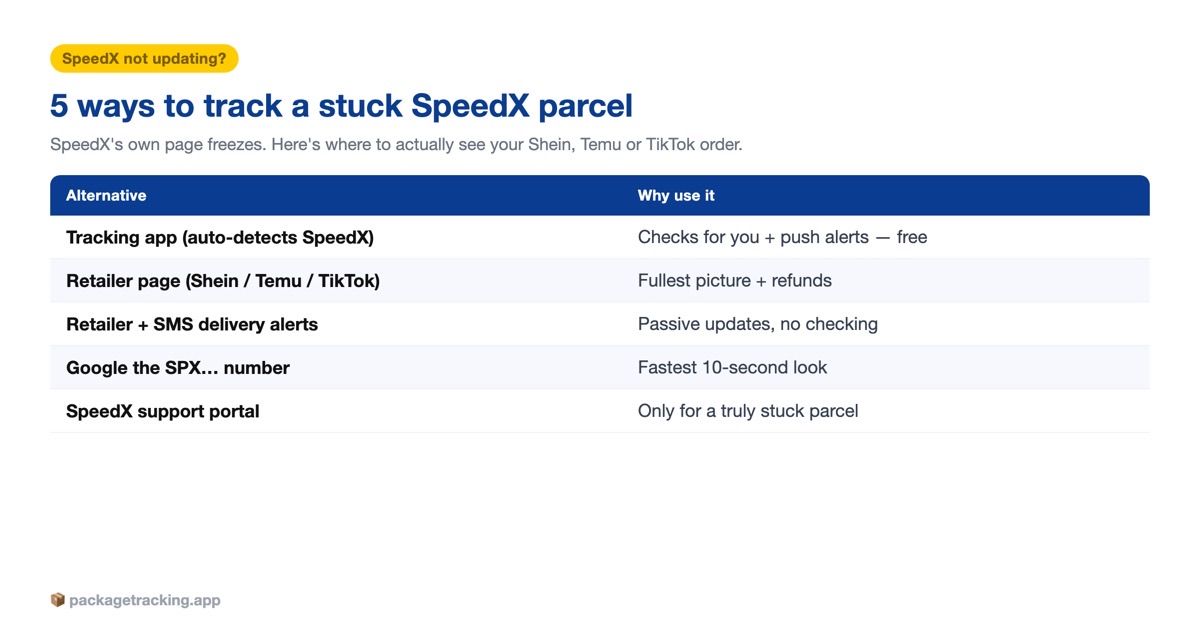
Below are the five realistic ways to follow an SPX parcel, ranked from most to least hands-off. None of them make SpeedX scan your box faster — but they get you the same data in a place that’s actually usable, and the top option checks for you so you can stop refreshing.
| Alternative | Best for | Update speed | Push alerts? | Cost |
|---|---|---|---|---|
| Universal tracking app (Package Tracker) | Hands-off, forget-about-it tracking | Automatic — it checks for you | Yes — every scan + delivery | Free |
| Retailer order page (Shein / Temu / TikTok Shop) | The fullest picture + refunds | Often ahead of SpeedX’s own site | In-app only, inconsistent | Free |
| Retailer + SMS delivery alerts | Passive updates, no checking | Pushed when a scan lands | Yes — retailer app / SMS | Free |
| Google the SPX number | The fastest 10-second look | Whatever SpeedX last posted | No | Free |
| SpeedX support portal | A genuinely stuck or lost parcel | Manual, slow replies | No | Free |
A quick way to read that table: if you want to stop thinking about the parcel, use option one. If you want the most complete picture — including the legs SpeedX hides — go to the retailer’s page. The rest are fine for a fast manual check.
1. A universal tracking app that auto-detects SpeedX
The core problem with SpeedX is that you have to go pull the update yourself, over and over, on a site that barely moves. A universal tracking app flips that around: you paste the SPX number once, it recognizes SpeedX from the number format automatically, and it watches the parcel for you — pushing a notification the moment a new scan lands and again when it’s delivered. Because it reads 1,700+ carriers, it also handles the messy reality of Shein and Temu orders, which hop between a China-side line, a cross-border carrier, and SpeedX for the last mile. The next time a Temu box ships on a carrier you’ve never heard of — SpeedX, UniUni, USPS — you don’t have to figure out which tracking site to visit; the app identifies it from the number and keeps watching. This is where Package Tracker fits, and it’s free.
2. Your retailer’s own order page (Shein, Temu, TikTok Shop)
This is the alternative most shoppers forget, and it’s often the best one. The store that sold you the item holds the shipping contract, so its order page frequently shows a fuller, earlier picture than SpeedX’s own tracker — including the China-side and cross-border legs SpeedX doesn’t surface. Open Shein’s My Orders and tap the item, check your Temu order history, or open the order in TikTok Shop. If the parcel is genuinely stuck in transit, the retailer is also the only party that can refund or reship it — so it’s worth being on this page anyway.
3. Turn on delivery notifications
If you would rather not check anything, let the updates come to you. In the Shein, Temu or TikTok Shop app, open the order and switch on shipping notifications, and opt into SpeedX’s own SMS alerts on its tracking page when they are offered. You get a ping when the parcel finally scans, when it is out for delivery, and when it lands — without refreshing a frozen page. The limit is that these alerts only fire when SpeedX actually posts a scan, so a stalled parcel stays silent; the watchful app in option one is what fills that gap. Watch the initials too: ‘SPX’ is also shorthand for Shopee Xpress, a different carrier, so make sure you are looking at SpeedX and not Shopee.
4. Paste the SPX number into Google
The ten-second option. Type or paste your full SPX number straight into Google (or your browser’s search bar) and it will usually surface the SpeedX tracking page and a status snippet without you hunting for the right site. It’s also the fastest way to confirm you’re even looking at the correct carrier when a retailer didn’t say who’s delivering. Don’t expect more detail than SpeedX itself publishes — but for a quick ‘is anything new?’ it beats reloading the official page five times an hour.
5. SpeedX customer service (manage your expectations)
Honesty first: SpeedX is built for the retailers who hire it, not for shoppers, so consumer support is thin. There’s no public phone hotline for buyers; your options are the SpeedX help center and the ‘Miles’ chatbot on speedx.io. Replies can be slow and generic. Use it only when a parcel is truly stuck for days — and even then, loop in the retailer first, because they can escalate on your behalf and actually issue a refund.
How to read your SPX tracking number
Your SPX number isn’t random — it tells you which SpeedX hub is handling the parcel. Most SpeedX numbers look like SPXATL130300009225: a fixed SPX prefix, a three-letter hub code, then a long digit string.
| Part of the number | Example | What it means |
|---|---|---|
| SPX prefix | SPX… | Speed Xpress — confirms SpeedX is your last-mile carrier |
| 3-letter hub code | SPXATL, SPXBOS, SPXLAX, SPXJFK | The metro/airport sorting hub routing your parcel — ATL = Atlanta, BOS = Boston, LAX = Los Angeles, JFK = New York |
| Digit string | …130300009225 | Your parcel’s unique ID inside SpeedX’s system |
Some parcels use a plain SPX-plus-15-digits format instead (for example SPX121055010785353) with no letter code — that’s normal too. Either way, you only ever need to type the number exactly as your retailer shows it; upper- or lower-case doesn’t matter, as long as every character is correct.
Why SpeedX tracking is not updating
SpeedX tracking only moves when a barcode is physically scanned, and a cross-border Shein or Temu parcel spends long stretches between scans. Three things cause the classic frozen line:
- The cross-border handoff. Your parcel flies from China inside a bulk container. Until it lands, clears US customs and is broken down into individual boxes, there’s nothing for SpeedX to scan — so the status sits still for days even though the parcel is genuinely moving.
- Batched scans. SpeedX handles enormous volume, and parcels get scanned in clumps at a hub rather than one at a time. Expect 12–24 hour (sometimes multi-day) gaps with no new event, especially over weekends and sale peaks.
- The last-mile gap. Between the regional hub and your door there may be only one or two scans, so a parcel can jump straight from ‘in transit’ to ‘out for delivery’ or even ‘delivered’ with almost nothing in between.
Here’s what a normal SPX journey actually looks like, so you can tell a boring gap from a real problem:
| Stage | What’s physically happening | What tracking shows | Typical time |
|---|---|---|---|
| Order + label | Retailer books the shipment; SPX number issued | ‘Label created’ / ‘Order info received’ | 0–2 days |
| Cross-border leg | Parcel flies from China in a bulk container | Nothing new, or ‘In transit’ — often frozen here | 3–8 days |
| US customs + import hub | Container clears customs and is broken down | A sudden jump, or still silent | 1–3 days |
| SpeedX regional hub | Scanned individually at your metro hub (SPXATL, etc.) | ‘Arrived at facility’ / ‘In transit’ | 1–2 days |
| Last mile | Loaded to a local van for your address | ‘Out for delivery’, then ‘Delivered’ | About 1 day |
When to actually worry (and who to contact)
Most ‘stuck’ SpeedX parcels aren’t lost — they’re mid-gap. But some genuinely need action. Use this line: movement within the last five business days is normal; a status frozen longer than that, or a hard error, is worth chasing.
- No scan for 5+ business days — check the retailer’s order page first, then open a case with the store (Shein, Temu, or TikTok Shop), not SpeedX. The retailer holds the contract and can refund or reship.
- Marked delivered but nothing arrived — don’t wait it out. See delivered but not received for the exact steps, and report it to the retailer inside their claim window.
- A delivery exception or return-to-sender — this means SpeedX tried and failed (bad address, no access). Fix the address with the retailer before the parcel loops all the way back.
In every case the retailer is your lever, not SpeedX. SpeedX can’t refund you — only the store you paid can. That’s the single most useful thing to remember when an SPX parcel goes quiet.
Other carriers you might see on Shein, Temu & TikTok orders
SpeedX is not the only unfamiliar carrier a Shein, Temu, TikTok Shop or AliExpress order can land on, and the same fix — paste the number and let one app watch it — works for all of them. In the US you might also get UniUni, OnTrac, LaserShip, Veho or SpeedPAK; earlier in the journey it may be J&T Express, Cainiao or an AliExpress line. And once the box shows Arrived at Facility or heads out for delivery, you are nearly there.
Frequently asked questions
SpeedX is one of the main last-mile carriers behind TikTok Shop — TikTok Shop order tracking shows how to tell which courier has your order.
SpeedX is a real US last-mile carrier founded in 2022 that delivers over a million parcels a day for retailers like Shein, Temu, and TikTok Shop. It is not a scam. The confusion comes from its slow, bare-bones tracking, not from anything fraudulent.
SpeedX only updates when your parcel is physically scanned, and cross-border orders sit for days between scans while they fly from China and clear customs. Gaps of one to three days are normal. If nothing changes for five business days, check with the retailer.
For a typical Shein or Temu order, expect roughly one to two weeks from purchase to your door, most of which is the international leg. Once SpeedX scans it at a US hub, the last mile is usually one to three days.
SpeedX numbers start with SPX, often followed by a three-letter hub code and a long string of digits, such as SPXATL130300009225. Some use SPX plus 15 digits with no letters. Type it exactly as your retailer shows it.
Yes. Open the order in the store you bought from — Shein, Temu, or TikTok Shop — and the tracking is attached to your order, so you don’t need to copy the SPX number anywhere.
No, SpeedX has no real consumer app; it only offers a web tracking page aimed at the retailers it works for. To get push alerts on your phone, use a universal tracking app that supports SpeedX instead.
No. Both get abbreviated ‘SPX’, but SpeedX is a US cross-border carrier and Shopee Xpress is Shopee’s own courier, used mostly in Southeast Asia. Make sure your tracking tool detected the right one.
First check around your doorstep, mailbox, and with neighbors, and give it a few hours in case it was scanned early. If it still hasn’t shown up, report it to the retailer within their claim window, since only the store can refund or reship.
Contact the retailer you bought from, not SpeedX. The store holds the shipping contract and is the only party that can refund, reship, or formally escalate with SpeedX. SpeedX’s own support is limited to a help center and a chatbot.
Yes, in most metro areas SpeedX delivers seven days a week, including weekends, because it handles high-volume e-commerce orders. Exact delivery days can vary by region and season.




3 Comments