
That new Moving Through Network USPS status just appeared on your tracking, and your package hasn’t budged in days. You can’t tell if it’s delayed, quietly stuck, or gone for good — and USPS won’t give you a straight ETA. Below, you get every variant decoded, a realistic delay timeline, and the exact day it’s worth opening a Missing Mail Search.
📦 Never refresh USPS tracking again
Package Tracker follows your ‘Moving Through Network’ USPS shipment automatically, auto-detects the carrier from any tracking number, and pushes an alert at every scan and on delivery across 1,700+ carriers — free.

Why you’re suddenly seeing ‘Moving Through Network’
If you’ve shipped with USPS for years and never saw this phrase until recently, that’s not your imagination — it’s genuinely new. It rolled out alongside Delivering for America, the roughly $40 billion, 10-year overhaul USPS began in March 2021 to consolidate its aging processing network into up to 60 large Regional Processing and Distribution Centers (RPDCs), around 180 Local Processing Centers, and a web of Sorting and Delivery Centers. As those hubs came online through 2024 and 2025, USPS also refreshed the language its scanners feed into tracking. “Moving Through Network” is one of those newer strings.
So the reason it looks unfamiliar is simple: it partly replaced older wording like “In Transit to Next Facility.” The status itself is not an error, and it is not a lost-package flag. It means your item is riding the trucks and conveyors that move mail between those regional hubs — which, during a network that is still being physically rebuilt, sometimes means longer gaps between scans than you’re used to. Buyers on eBay, Amazon, Etsy and Poshmark tend to notice it most, because those marketplaces surface the raw USPS status the moment it changes.
What ‘Moving Through Network’ actually means
Strip away the rebrand and it’s a plain transit status. Your package has been accepted, scanned, and is moving between USPS facilities toward the hub closest to your address. The catch is that USPS only scans at specific checkpoints — acceptance, arrival at a hub, departure from a hub, arrival at your local unit. Between those points, tracking can sit on “Moving Through Network” for a day or more with no change, even while the package is physically on a truck. The header is the headline; the sub-line beneath it is the real story.
The status decoder: every variant, translated
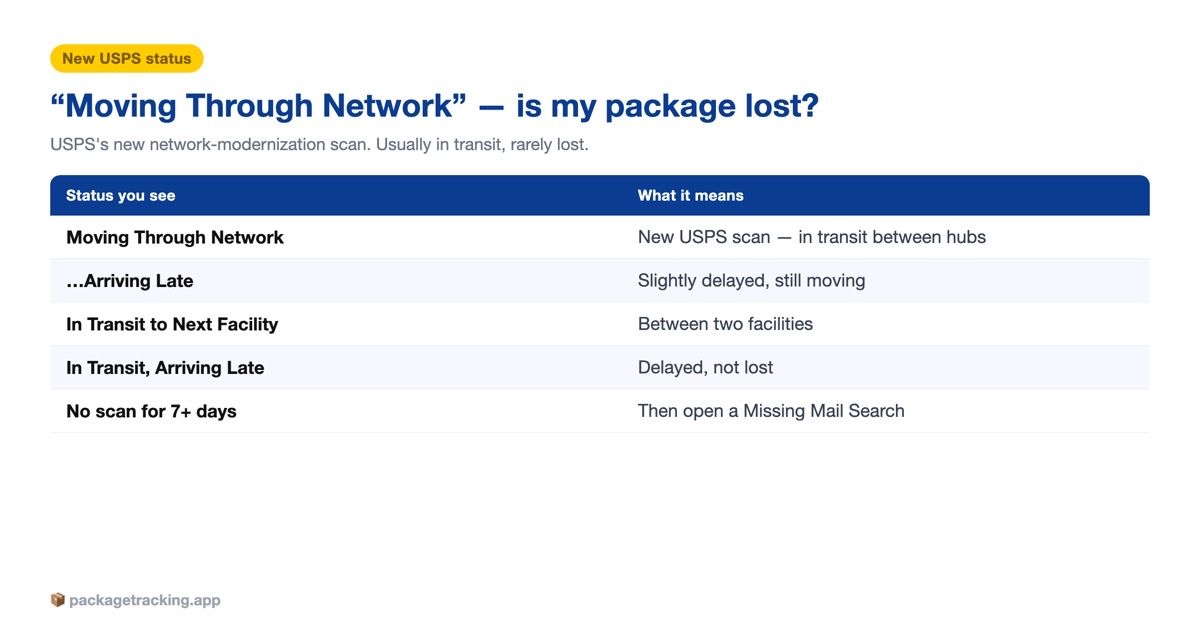
The header rarely appears alone. What tells you whether to relax or act is the smaller line printed under it. Here’s each combination and what it actually means:
| What you see | What it means | On time or delayed? |
|---|---|---|
| Moving Through Network — In Transit to Next Facility | Standard transit; the package left one hub and is heading to the next. The most common, boring version. | On track |
| Moving Through Network — Arriving Late | USPS missed an internal transfer or the hub is backed up. Still moving, just behind the original estimate. | Delayed, not lost |
| Moving Through Network — Package will arrive later than expected, but is still on its way. It is currently in transit to the next facility. | The long-form of ‘Arriving Late.’ Identical meaning; USPS has quietly pushed your delivery date. | Delayed, not lost |
| Moving Through Network — In Transit to Next Facility, Arriving Late | Legacy and new wording stacked together during the rollout. Same thing: delayed but in motion. | Delayed, not lost |
| Moving Through Network (date only, no sub-line) | A checkpoint scan with no ETA change. Neutral — judge it by the last-scan date, not the header. | Usually on track |
Moving Through Network vs ‘In Transit, Arriving Late’ vs ‘In Transit to Next Facility’
These three get confused constantly, because USPS used them in different eras and sometimes shows two at once. Here’s how they line up:
| Status | Era | What it signals | Is it a problem? |
|---|---|---|---|
| In Transit to Next Facility | Legacy wording | Package is between two hubs, on schedule. Now often shown as a sub-line under ‘Moving Through Network.’ | No |
| Moving Through Network | New (network-modernization language) | Umbrella for ‘in the system, between scans.’ Read the sub-line for the real story. | No, by itself |
| In Transit, Arriving Late | Legacy wording | The old phrase for a package delayed past its estimate but still moving. | Mild — still on its way |
| Moving Through Network, Arriving Late | New | The modern equivalent of ‘In Transit, Arriving Late.’ Same meaning, new label. | Mild — still on its way |
| Shipment Received, Package Acceptance Pending | Any era | Label scanned but not yet accepted into transit — the package isn’t moving yet. | Not yet; a different situation |
The practical takeaway: “Moving Through Network” and “In Transit to Next Facility” describe the same healthy state in different words, and “Moving Through Network, Arriving Late” is just the rebranded “In Transit, Arriving Late.” None of them mean lost. Different statuses point to different situations, though — if yours reads Shipment Received, Package Acceptance Pending it hasn’t entered transit at all, while Arrived at Facility means it reached a hub but hasn’t left, and Departed Shipping Partner Facility means a partner handed it off to USPS. Match the exact words to the right guide and most of the worry disappears.
How long the delay really lasts
For a status this vague, people over-index on silence. A gap between scans is normal; a gap that stretches past a week is not. Use the last-scan date — not the header text — as your clock.
A realistic delay timeline
| Time since last scan / past estimate | How normal it is | What to do |
|---|---|---|
| 0–2 days, no new scan | Completely normal between hubs, especially over a weekend or holiday. | Nothing. Let it ride. |
| 3–5 days, no movement | Common while regional hubs are congested; still not a lost package. | Turn on push alerts so you catch the next scan instantly. |
| 5–7 days past the expected date | Delayed but usually recoverable. | Message the sender; confirm the delivery address is correct. |
| 7+ days from the mailing date, no progress | Now worth escalating. | File a USPS Missing Mail Search (see below). |
| 15+ days domestic / 30+ days international, no scans | Likely genuinely lost or misrouted. | Missing Mail Search plus a refund or insurance claim through the sender. |
Two things skew these ranges. Holiday peaks (late November through December) and severe weather can add several days at any stage, and a package that never gets a second scan after acceptance is more concerning than one that scans, goes quiet for four days, then scans again — movement, even slow and gappy movement, is the good sign. If the status ever flips to a delivery exception, that’s a different signal: an address, weather, or handoff problem USPS wants resolved before it can continue.
When to open a USPS Missing Mail Search — and how
USPS lets you file a Missing Mail Search Request starting 7 days from the mailing date, per usps.com. Filing earlier is usually pointless — the system won’t treat the item as missing yet. Once your package genuinely qualifies (stalled a week or more with no useful scans), work through it in order:
- Recheck USPS Tracking for a fresh scan — a package that’s stuck in transit often updates the moment it reaches the next hub.
- If tracking itself looks frozen or broken, rule out a bad number first — here’s what to do when your tracking number isn’t working.
- Submit a Help Request Form on usps.com; it routes to your local Post Office to physically look for the item.
- If that doesn’t resolve it, file the Missing Mail Search Request with the sender and recipient addresses, a description, and photos of the contents if you have them.
- For anything paid, ask the sender to open a refund or insurance claim in parallel — USPS pays the mailer, not the recipient.
A Missing Mail Search doesn’t just hunt for your package; it flags the tracking number so any facility that scans it knows to route it to you or to the USPS Mail Recovery Center. A lot of packages resurface within a few days of a search being filed.
Track it without refreshing the page
The maddening part of “Moving Through Network” is the waiting — USPS won’t email you when the next scan lands, so you end up reloading the tracking page all day. Let an app watch it instead. Out for Delivery is the scan you actually care about, and you want to know the second it appears, not hours later. Set an alert once and you’ll get a push at every checkpoint — including the late-arriving ones — without lifting a finger.
Frequently asked questions
For the full picture of the journey, see what in transit means for a package.
No. It means your package is inside the USPS system and moving between facilities, just without a fresh scan at that moment. It only becomes a concern if there is no movement for about a week.
USPS updated its tracking language as it rebuilt its network under the Delivering for America plan, consolidating processing into large regional hubs. “Moving Through Network” is the newer umbrella phrase that partly replaced older wording like “In Transit to Next Facility.”
Often just one to three days between scans, which is completely normal. During congestion or holidays it can stretch to five days or more, but the package is typically still moving toward you.
Yes, they mean the same thing. Both say your package is delayed past its original estimate but still on its way. “Arriving Late” is simply the newer label USPS uses.
First confirm the delivery address and message the sender. Turn on tracking alerts so you catch the next scan, and if there is still no movement seven days after mailing, file a USPS Missing Mail Search.
They describe the same healthy state — a package traveling between USPS hubs — in different words. USPS now often shows “In Transit to Next Facility” as a sub-line beneath the “Moving Through Network” header.
You can submit one starting seven days from the mailing date. Filing earlier usually will not help, because USPS does not treat the item as missing until then.
Not necessarily. USPS only scans at set checkpoints, so the status can sit unchanged while the package is physically on a truck. A gap under a week is usually just the space between scans.
Most USPS services do not guarantee delivery dates, so late arrival alone rarely qualifies for a refund. Priority Mail Express is the main exception, and for lost items the sender can claim insurance or a refund.
Yes, in almost all cases. You will typically see it change to an arrival scan, then “Out for Delivery,” and finally “Delivered.” Setting up push alerts is the easiest way to catch each update.




2 Comments