
Your Shopee Xpress tracking number returns nothing on the tracker you pasted it into, and the SPX code looks like gibberish. The prefix changes by country, cross-border parcels switch numbers mid-route, and SPX Brasil codes confuse everyone. This page decodes every SPX format, tells you exactly where each number actually works, and gives you a per-country status glossary.
📦 Track every SPX parcel, hands-free
Package Tracker auto-detects Shopee Xpress from any SPX number, follows every leg across 1,700+ carriers, and pushes an alert at each scan and on delivery — free.

What an SPX tracking number actually is
SPX stands for Shopee Xpress (also written SPX Express), Shopee’s in-house courier. The number on your parcel isn’t a public postal barcode like a USPS or Correios reference — it’s generated inside Shopee’s Logistics Service (SLS) network the moment your order ships. That one fact explains most of the confusion: the code is built to resolve inside Shopee first, and only later — sometimes never — inside third-party trackers. Before you paste it anywhere, it helps to know which of several SPX formats you’re holding, because the prefix changes with every country Shopee runs in.
Decode your SPX number: the country-prefix table
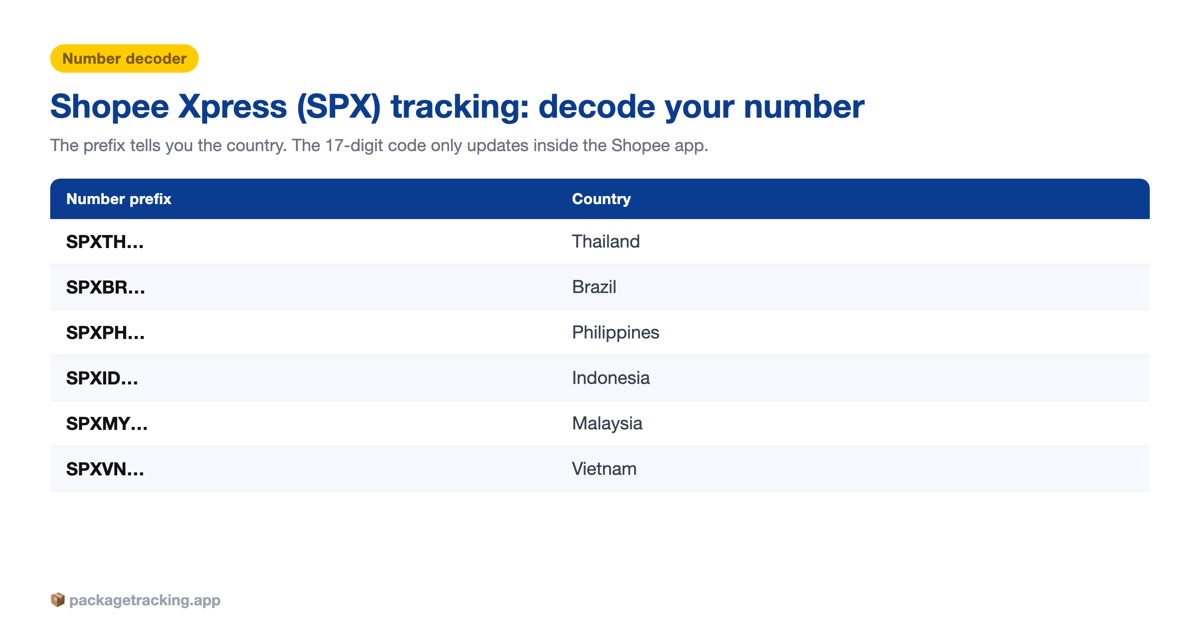
Aggregator sites show one generic “SPX” box and hope for the best. In reality SPX codes fall into a few families. The consumer-facing code you see in the app usually leads with a country tag — SPXSG, SPEPH, SPXTH, SPXID, SPXMY, SPXVN — while the internal SLS reference couriers scan often drops the “SPX” and starts with a two-letter country code plus twelve digits and a check letter. Match your number to the row below.
| Prefix you see | Country + official SPX site | Typical format & length | Example |
|---|---|---|---|
| SPXSG / SG | Singapore — spx.sg | SPXSG + 8–9 digits + 1 check letter (17 characters) | SPXSG00780842992B |
| SPEPH / SPXPH | Philippines — spx.ph | SPEPH + 12 digits, or 11 digits + 1 letter (17 characters) | SPEPH01206896633A |
| SPXTH / TH | Thailand — spx.co.th | TH + 12 digits (+ check letter) | TH068974877738 |
| SPXMY / MY | Malaysia — spx.com.my | MY + 12 digits + check letter | MY267827591091J |
| SPXID / ID | Indonesia — spx.co.id | SPXID or ID + 11–14 digits | SPXID04XXXXXXXXXX |
| SPXVN / VN | Vietnam — spx.vn | VN or SPXVN + 12 digits | VNXXXXXXXXXXXX |
| BR (starts with) | Brazil — spx.com.br | BR + 10–16 digits (does not end in BR) | BR23059483021 |
| SPX + 15 digits | Cross-border (SHEIN, Temu, AliExpress legs) | SPX + 15 digits (18 characters) | SPX + 15 digits |
Two things trip people up. First, the “17-digit” pattern everyone quotes is really 17 characters — a five-character prefix (SPXSG, SPEPH) plus twelve alphanumerics, the last of which is often a check letter, not part of the count. Second, one parcel can carry two different SPX numbers: a cross-border leg number and the domestic one Shopee generates when the box lands in your country. SPX also carries parcels for other marketplaces, so a SHEIN order or an AliExpress order routed through Shopee Xpress can arrive under an SPX + 15-digit code even though you never opened the Shopee app.
Why your SPX number “won’t work” on third-party trackers
You paste the code into a global tracker and get “no information found.” That rarely means the parcel is lost. Four causes cover almost every case.
- It’s an internal Shopee reference. The SLS number is built for Shopee’s own network, and Shopee doesn’t publish a public tracking feed for every lane, so many aggregators have nothing to show. The number that won’t work on their site often works fine in the Shopee app.
- The number changed mid-route. For cross-border orders, Shopee’s own help center notes a new domestic tracking number is issued once the parcel reaches the destination country. Your third-party app is usually holding the old first-leg code — frequently a Cainiao or China Post reference — while live updates now sit on the new SPX number.
- It hasn’t been scanned yet. SPX codes are created at label generation but only activate after the first physical pickup scan, usually within 24–48 hours. Before that, every tracker shows nothing.
- The number is wrong. A seller can paste a typo or the wrong label. If your code matches no row in the decoder above, ask the seller to reconfirm it.
The fix is order of operations: check the Shopee app first, then your country’s SPX site, and only then a third-party tool — giving any fresh label a full 24–48 hours. If the code is valid but frozen for more than a few days, that’s a genuinely stuck-in-transit parcel, not a broken number.
The reliable way to track an SPX parcel
- In the Shopee app: open Me → My Purchases, tap the order, then Track. This is the source of truth and updates first.
- On the official SPX site for your market: spx.ph (Philippines), spx.co.id (Indonesia), spx.com.my (Malaysia), spx.co.th (Thailand), spx.com.br (Brazil), plus spx.sg and spx.vn. Paste the exact code, prefix included.
- In an auto-detect tracker: if you buy across several marketplaces, a tool that reads the prefix, picks the right SPX network, and follows both the cross-border and domestic legs saves the copy-paste — and catches the moment out for delivery appears so you’re home for the knock.
SPX status glossary: what each scan means
SPX wording differs slightly by country and app language, but the lifecycle is consistent. Here’s what each status means and when to act.
| Status (and common variations) | What it means | What to do |
|---|---|---|
| Order created / Pickup requested | Label generated; parcel not yet with SPX | Wait for the pickup scan (24–48h) |
| Picked up / Parcel collected | SPX has physically taken the parcel | Tracking is now live |
| Arrived at sorting center / Arrived at facility | At an SPX hub being sorted | Normal — expect several of these |
| In transit / Transported to another station | Moving between SPX hubs | No action; keep watching |
| Arrived at destination hub | At the hub nearest you | Delivery usually within 1–2 days |
| Out for delivery / Courier is delivering | On the van today | Be reachable and have ID/OTP ready |
| Delivered | Marked as handed over at drop-off | If you didn’t receive it, act fast (see FAQ) |
| Delivery failed / Buyer unavailable / Address mismatch | Attempt made, could not complete | Fix address and phone in-app; SPX retries |
| On-hold / Misroute | Parcel paused or sent to the wrong hub | Usually self-resolves in 1–2 days |
| Returned to sender (RTS) | Heading back after failed attempts | Contact the seller — see return to sender |
| Lost / Damaged | Exception flagged by SPX | Open a Shopee dispute with photos |
SPX Brasil: the newest market, and the most confusing
Brazil is Shopee Xpress’s newest large market, and it generates the most tracking confusion because Shopee splits domestic delivery between two carriers: the national post (Correios) and its own SPX network. Telling them apart takes one glance once you know the rule.
SPX or Correios? Read the code
An SPX Brasil code begins with BR followed by 10–16 digits — for example, BR23059483021 — and, per SPX’s own guidance, it starts with BR rather than ending in it. A Correios code does the opposite: it ends in BR (like LX123456789BR). If your code starts with BR, track it on spx.com.br or in the Shopee app, not on the Correios site.
Code activated but nothing moves
SPX Brasil codes typically go live 24–48 business hours after the parcel is physically collected — the time it takes to enter the first logistics center. SPX also delivers on weekends and holidays, so a quiet Saturday isn’t a red flag. If there’s still no movement after a few business days, treat it like any package stuck in transit: message the seller for a handover confirmation before you open a dispute.
Frequently asked questions
Shipped by J&T instead of SPX? Decode J&T Express tracking and which country’s J&T actually has it.
SPX stands for Shopee Xpress, Shopee’s in-house courier, also written SPX Express. The tracking number is generated inside Shopee’s own logistics network rather than by a public postal service.
SPX numbers are internal Shopee references, so many third-party trackers have no public feed to read. Check the Shopee app or your country’s SPX site first, and allow 24 to 48 hours for a new label to activate.
Usually 24 to 48 hours after the parcel is physically picked up. Before that first scan the code exists but shows no movement anywhere.
It varies by country. Singapore and the Philippines use a 17-character code (SPXSG or SPEPH plus digits and a check letter), while Malaysia, Thailand, Indonesia and Vietnam often use a two-letter country code plus 12 digits. Brazil codes start with BR.
Use the Shopee app or spx.com.br and enter the code that starts with BR. If your code ends in BR instead, it is a Correios shipment and should be tracked on the Correios site.
No. Shopee splits Brazilian deliveries between Correios and its own SPX network. Codes that start with BR are SPX, and codes that end in BR are Correios.
For cross-border orders, Shopee issues a new domestic tracking number once the parcel arrives in your country. The first-leg number stops updating and the new SPX number takes over.
Yes. Enter the code on your country’s official SPX website, such as spx.ph, spx.co.id, spx.com.my or spx.com.br, or use an auto-detect tracker that recognises the SPX prefix.
The parcel is temporarily paused, often due to a sorting issue, the wrong hub, or an address problem. It usually clears within a day or two, so update your address and phone number in the app if prompted.
Check with household members and neighbours first, then contact the seller and open a Shopee dispute promptly. SPX marks delivery at courier hand-over, so report any mismatch quickly with photo evidence.




1 Comment